Thursday, 24 December 2009
Forbidden side of a web site-See what web sites hide from you
 10:31 |
  Posted by
Rabiul islam
Posted by
Rabiul islam
We all know what search engines do right? yes Search! baby search! they search every where for everything. And what do web site owners do? The do various SEO (search engine optimization) stuff to make the things easy for the search engines so the SE’s will search the directories inside the web sites easily and bring more traffic to the site!. Hm… Ok C.J.! enough of the technical stuff,why are you telling us all this? This is why…
Do you know that there are some directories in web sites that they don’t want the general public to know about? Well, there are! Then what do the site owners do to hide them from us? They bribe the search engines :D Hm…
well what they do is put a text file including the directory names, that should be excluded when searching. So the search engines read that file first and exclude their content in the search results page……
But you know that us geeks can’t stay out of trouble right? Yes! there’s a way you can see what are the hidden directories are! All you got to do is put /robots.txt after the domain name and see what the site owners don’t want you to see :twisted:
How about checking out what Mr.Bill Gates got to hide from us? :D Here you go
http://www.micr*s*ft.c*m/r*b*ts.txt
And what about larry and sergei? yeh!
http://www.g**gle.c*m/r*b*ts.txt
Do you know that there are some directories in web sites that they don’t want the general public to know about? Well, there are! Then what do the site owners do to hide them from us? They bribe the search engines :D Hm…
well what they do is put a text file including the directory names, that should be excluded when searching. So the search engines read that file first and exclude their content in the search results page……
But you know that us geeks can’t stay out of trouble right? Yes! there’s a way you can see what are the hidden directories are! All you got to do is put /robots.txt after the domain name and see what the site owners don’t want you to see :twisted:
How about checking out what Mr.Bill Gates got to hide from us? :D Here you go
http://www.micr*s*ft.c*m/r*b*ts.txt
And what about larry and sergei? yeh!
http://www.g**gle.c*m/r*b*ts.txt
 Labels:

What is my IP address
You would like to know what is your IP address when you are connected on the Internet? You can get your answer on several different ways. You can go to whatismyipaddress.com and you'll see your IP and where are you on Google map. But if you need more information you can go to Start - Run, than type CMD and press ENTER. There, just type
"ipconfig/all" (without quotes) and press ENTER. You will get more than IP address, you'll see full profile of your connection like on image bellow:
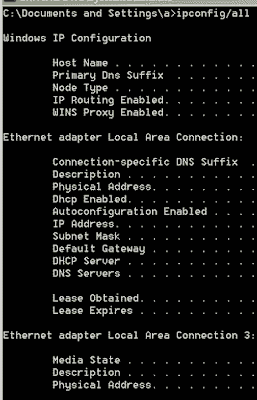
"ipconfig/all" (without quotes) and press ENTER. You will get more than IP address, you'll see full profile of your connection like on image bellow:

Learn Tricks And Tips Of The New Windows 7
Is Windows 7 the answer to all the questions that Windows Vista poses? Windows 7 is fast, stable and far more reliable than you'd expect.
Windows 7 is full of great new features and enhancements and was built around users feedback, so you'll see a lot of things you've asked for.
Microsoft has made its intentions clear: Windows 7 is intended to right the wrongs Vista wrought, but retain that operating system's good points. The OS will be quicker than Vista, which can only be a good thing.
And while it doesn't include major new features, take the time to explore and you'll find lots of useful changes that will make a real difference in how you use your PC.
Like any version of Windows there are various tips, tweaks and hacks you can perform to get your PC working the way you want it.
This book guides you through the 100 most asked questions on Windows 7 and on how to get the most from your Windows 7 installation.
Windows 7 is full of great new features and enhancements and was built around users feedback, so you'll see a lot of things you've asked for.
Microsoft has made its intentions clear: Windows 7 is intended to right the wrongs Vista wrought, but retain that operating system's good points. The OS will be quicker than Vista, which can only be a good thing.
And while it doesn't include major new features, take the time to explore and you'll find lots of useful changes that will make a real difference in how you use your PC.
Like any version of Windows there are various tips, tweaks and hacks you can perform to get your PC working the way you want it.
This book guides you through the 100 most asked questions on Windows 7 and on how to get the most from your Windows 7 installation.
Laptop Tips
Thermal dissipation - Laptop cooling
Never use your laptop directly on a surface that prevents proper air flow, such as inside the laptop case, on a blanket or pillow. Periodically check that vents are not obstructed. Use a mobile cooling pad if necessary.
Never use your laptop directly on a surface that prevents proper air flow, such as inside the laptop case, on a blanket or pillow. Periodically check that vents are not obstructed. Use a mobile cooling pad if necessary.
Battery charge - Laptop autonomy
Discharge completely your battery at least once per month.
Discharge completely your battery at least once per month.
Security - Laptop tracking
Use the CyberAngel security solution to track your laptop in case it is stolen.
Use the CyberAngel security solution to track your laptop in case it is stolen.
Viruses
It is not enough to have an antivirus program installed. It needs to be kept up-to-date, and we recommend to update it at least once per week.
It is not enough to have an antivirus program installed. It needs to be kept up-to-date, and we recommend to update it at least once per week.
Windows Updates
Make sure that your computer downloads Window Updates periodically and frequently. This will enhance stability and security of your operating system.
Make sure that your computer downloads Window Updates periodically and frequently. This will enhance stability and security of your operating system.
Carrying
Always use an appropriate carrying bag when traveling, to enhance shock absorption. Whenever you need to ship your laptop through a carrier (SUPS, FedEx, UPS, etc...), always use packaging specifically designed for laptops transit.
Always use an appropriate carrying bag when traveling, to enhance shock absorption. Whenever you need to ship your laptop through a carrier (SUPS, FedEx, UPS, etc...), always use packaging specifically designed for laptops transit.
Shocks
Because of they are designed to maximize mobility, laptops are prone to shocks. Always turn your laptop OFF before you move your notebook from a place to another, unless it is well stabilized on a stand that is designed to absorb shocks.
Because of they are designed to maximize mobility, laptops are prone to shocks. Always turn your laptop OFF before you move your notebook from a place to another, unless it is well stabilized on a stand that is designed to absorb shocks.
Humidity
Laptops are very sensitive to humidity. Avoid liquid exposure as much as you can (water, wine, etc...).
Laptops are very sensitive to humidity. Avoid liquid exposure as much as you can (water, wine, etc...).
Dust
Laptops are very sensitive to dust. Make sure the laptop is never left on a floor, but that it is always high on a table, desk, stand, etc... Check vents frequently to see if they are not obstructed.
Laptops are very sensitive to dust. Make sure the laptop is never left on a floor, but that it is always high on a table, desk, stand, etc... Check vents frequently to see if they are not obstructed.
Preventing Laptop Computer Theft
Laptop computers are easy targets for thieves. Laptop computers are small, valuable, can be removed quickly, and are easily hidden. Laptop computers can be worth up to $5000 or more. The laptop computer can be pawned at a pawnshop for half its value.
Here are a few tips to reduce the risk of having your laptop stolen.
- Don’t leave your laptop out in the open even for a second.
- Remember extreme temperatures can cause damage to your laptop.
- Transport your laptop in a nondescript case.
- Write down the serial number and keep it in a safe place.
- Always back up your information on disks and store them in a safe place.
Mozilla Firefox Hotkeys | Keyboard Shortcuts
| CTRL + A | Select all text on a webpage |
| CTRL + B | Open the Bookmarks sidebar |
| CTRL + C | Copy the selected text to the Windows clipboard |
| CTRL + D | Bookmark the current webpage |
| CTRL + F | Find text within the current webpage |
| CTRL + G | Find more text within the same webpage |
| CTRL + H | Opens the webpage History sidebar |
| CTRL + I | Open the Bookmarks sidebar |
| CTRL + J | Opens the Download Dialogue Box |
| CTRL + K | Places the cursor in the Web Search box ready to type your search |
| CTRL + L | Places the cursor into the URL box ready to type a website address |
| CTRL + M | Opens your mail program (if you have one) to create a new email message |
| CTRL + N | Opens a new Firefox window |
| CTRL + O | Open a local file |
| CTRL + P | Print the current webpage |
| CTRL + R | Reloads the current webpage |
| CTRL + S | Save the current webpage on your PC |
| CTRL + T | Opens a new Firefox Tab |
| CTRL + U | View the page source of the current webpage |
| CTRL + V | Paste the contents of the Windows clipboard |
| CTRL + W | Closes the current Firefox Tab or Window (if more than one tab is open) |
| CTRL + X | Cut the selected text |
| CTRL + Z | Undo the last action |
Windows Keyboard Shortcuts for Mozilla Firefox
| F1 | Opens Firefox help |
| F3 | Find more text within the same webpage |
| F5 | Reload the current webpage |
| F6 | Toggles the cursor between the address/URL input box and the current webpage |
| F7 | Toggles Caret Browsing on and off. Used to be able to select text on a webpage with the keyboard |
| F11 | Switch to Full Screen mode |
Subscribe to:
Posts (Atom)

Copy this code to your website to display this banner!
